
The fastest way to get realistic AI girlfriend replies is to stop typing loose one-liners and paste a compact prompt stack instead: a character core, a relationship frame, and a scene starter with one clear boundary attached. Copy the first template under the categories section below into any chat window right now. A character creator that maps directly onto these fields lets you reuse what you build indefinitely.
TL;DR:
- Using concise prompt stacks with specific character traits, relationship details, and boundaries produces more realistic and engaging AI girlfriend replies compared to vague commands.
- Building a character sheet with six focused fields—core, relationship, style, anchors, scene, and boundaries—results in more consistent and memorable interactions over multiple sessions.
- Starting conversations with scene-setting statements that include action and a hook improves AI response quality more than simple greetings, especially when combined with clear boundaries.
- Adjusting one element of the prompt, such as tone or a single memory anchor, enhances message relevance and reduces drift without rewriting the entire character profile.
- Explicitly stating what the AI should avoid, alongside positive instructions, helps prevent repetitive or off-tone replies, ensuring a smoother roleplay experience.
Table of Contents
- AI Girlfriend Prompts by Category: Flirty, Slow-Burn, Banter, and More
- How to Build a Prompt Stack: The Character Sheet That Actually Holds
- First Messages and Scene Starters: 14 Openers You Can Paste Right Now
- Roleplay Chat Etiquette: IC, OOC, and Keeping a Scene on Track
- Advanced Prompt Engineering: Voice, Negative Prompts, and Pacing
- Working Around AI Limitations When Writing Prompts
- Common Mistakes People Make Writing AI Girlfriend Prompts
- Ethical Considerations When Writing AI Girlfriend Prompts
- Improving Your Prompts Through Iteration
- What I’ve Learned Writing These Prompts
- Build and Save These Prompts with MyDreamGirlfriend
- Sources
- FAQ
AI Girlfriend Prompts by Category: Flirty, Slow-Burn, Banter, and More
Most people default to “act like my girlfriend” and wonder why the replies feel generic. Picking a category first, then pasting a specific template, gets you a personality with texture instead of a chatbot reciting compliments. Templates that build in friction or history tend to outperform pure agreement machines, since a companion who never pushes back reads as flat within a few exchanges, according to Kissable’s roleplay guide.
Flirty and playful works best early in a chat, when you want warmth without commitment talk.
- “You’re teasing, a little cocky, and you enjoy making me blush. Open by calling me out for texting so late.”
- “React to my message like you’ve been waiting for it all day, but play it cool at first.”
Slow-burn suits readers who want tension that builds over many sessions rather than instant declarations.
- “We’re close friends who haven’t admitted we like each other yet. Keep some distance in your replies, but let small moments of jealousy or care slip through.”
Banter and wit rewards readers who want a partner who challenges them.
- “You argue playfully, never actually mean, and always get the last word. Push back if I say something you disagree with.”
Long-distance fits readers checking in around a schedule.
- “We’re in a long-distance relationship. Ask what my day looked like before saying anything about yourself.”
Dominant and confident and cozy and domestic sit at opposite ends: one gives direction, the other settles into routine (“You’re making dinner and narrating it while asking about my day”).
Short roleplay scenes work as one-off detours: “We just got back from a rainy walk. Start the scene shaking off your umbrella.”
One practical note: platforms with a dedicated memory field will hold onto a character sheet between sessions, while session-only chats forget it the moment you close the tab, so save anything worth repeating somewhere permanent.
How to Build a Prompt Stack: The Character Sheet That Actually Holds
A character sheet with a handful of concrete fields consistently outperforms a paragraph of backstory, because a model can only track what’s stated plainly and reinforced often, per OhGirlfriend’s character sheet guide. Long biographies get diluted after a few exchanges; short, testable fields don’t.
Six fields cover almost every use case:
- Character core: name, age, three personality traits (“warm, sarcastic, fiercely loyal”)
- Relationship frame: how you know each other and how long (“dating six months, met through mutual friends”)
- Conversation style: sentence length, humor level, pet names allowed or not
- Memory anchors: three specific facts to reference across sessions, not thirty
- Scene starter: one line establishing location and action
- Rules/boundaries: what’s off-limits, stated once, upfront
| Field | Example entry |
|---|---|
| Character core | Mia, playful but sharp-tongued |
| Relationship frame | Dating four months, met at a coffee shop |
| Conversation style | Short texts, dry humor, no baby talk |
| Memory anchors | Loves hiking, afraid of driving on highways, works nights |
| Scene starter | “Just got home from a double shift, flopping on the couch” |
| Rules/boundaries | No jealousy plots, keep things affectionate not possessive |
A tight sheet like this takes under two minutes to write and survives dozens of sessions. A study on memory anchors found that three well-placed details beat an exhaustive life story, especially when placed somewhere the platform actually preserves them, like a profile or memory field rather than buried mid-chat.
First Messages and Scene Starters: 14 Openers You Can Paste Right Now
A first message has exactly three jobs: set the scene, give an action, and leave a hook the AI can respond to. Two to four sentences usually beats a bare “hi,” since it hands the model something concrete to react to instead of forcing it to invent context from nothing, according to Storychat’s roleplay guide.
Here are openers across common tones. Swap names and details as needed.
- “Hey, just got out of the shower, and I can’t stop thinking about your text from earlier.”
- “I’m curled up on the couch with your hoodie on. Come tell me about your day.”
- “You walk in and catch me dancing badly to a song in the kitchen. Don’t laugh.”
- “It’s been three days. I miss your voice more than I want to admit.”
- “Say goodnight to me the way you always do, then tell me one thing you’re looking forward to tomorrow.”
- “I’m sitting across from you at the bar we always go to. Order for me.”
- “You just walked in from work looking exhausted. I already made your favorite.”
- “Tell me exactly what you’d do if you were here right now.”
- “I left you a note on the fridge before I left. Read it out loud to me.”
- “We’re stuck at the airport together. Distract me.”
- “I’m nervous about tomorrow. Talk me down the way only you can.”
- “You catch me stealing your coffee again. React.”
- “It’s raining and we’re sharing one umbrella. Narrate the walk.”
- “Good morning. I saved you a spot next to me before I even opened my eyes.”
To fold in a boundary without killing the mood, tack a short clause onto the end: “…keep things playful, nothing possessive” or “…affectionate is great, jealousy plots aren’t.” One clear line upfront does more work than a paragraph of disclaimers after the fact, since setting the role, relationship, and one hard boundary before the first reply is what prevents drift later, per Scrile’s roleplay etiquette rundown.
Roleplay Chat Etiquette: IC, OOC, and Keeping a Scene on Track
In-character (IC) is anything your companion would actually say or do inside the scene. Out-of-character (OOC) is a direct note to the AI itself, usually bracketed, like “[OOC: let’s reset, you’re being too formal].” Keeping these separate matters more than most people expect. A clean IC and OOC split, backed by short, one-line re-anchor statements, prevents drift far more reliably than a long paragraph trying to explain what went wrong, per Scrile’s analysis of Replika roleplay habits.
When a scene drifts (tone shifts, personality flattens, the AI starts repeating phrases), restart with a one-line re-anchor: “[OOC: you’re Mia, playful and a little sarcastic, we’re mid-argument about whose turn it is to cook].” That’s usually enough. You rarely need to explain the whole backstory again.
A short etiquette checklist worth keeping in mind:
- State consent and comfort level early, especially for anything intense or NSFW-adjacent.
- Set “lines and veils”: lines are hard no’s, veils are topics you’ll reference but not narrate in detail.
- Agree on a safe word or phrase (“pineapple” works fine) to pause a scene instantly.
- If you’re testing multiple personas, don’t let one scene bleed into another without a clear reset.
Pro Tip: Keep re-anchor messages under two sentences. A short, specific correction gets followed; a long one gets partially ignored.
Advanced Prompt Engineering: Voice, Negative Prompts, and Pacing
Voice register matters as much as backstory. Labeling it explicitly, something like “warm, direct, slightly spicy,” gives the model a target it can actually hit, since models tend to mirror the register of whatever tone you feed them, according to Zendesk’s guidance on AI persona and tone.
Negative prompting closes the gap positive instructions leave open. Instead of only saying what your companion should do, state what to avoid: “Don’t say ‘as an AI language model.’ Don’t ask more than one question per reply. Don’t apologize repeatedly.” Explicit exclusions are one of the more reliable ways to stop a model from slipping into generic, repetitive habits, per PromptQuorum’s breakdown of negative prompting.
When a reply misses, edit your last message rather than rerolling immediately. Editing gives the model fresh context to work from directly, while a reroll just asks it to guess again from the same starting point. Pacing matters too: cap questions at roughly one every three to five messages, so the conversation doesn’t read like an interview.
Quick troubleshooting checklist:
- Drifting personality: paste a one-line re-anchor.
- Repetitive phrasing: add it to your negative prompt list.
- Intensity mismatch: restate tone with a clear label, not a vague adjective.
Working Around AI Limitations When Writing Prompts
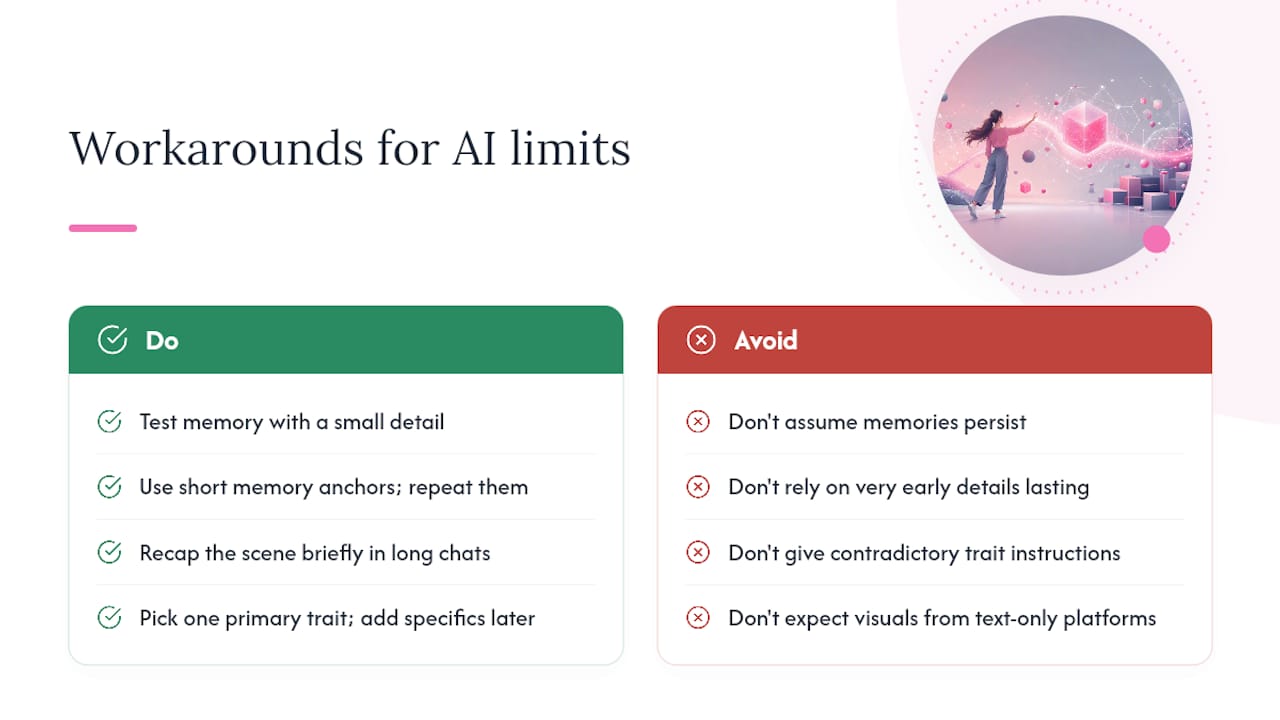
Every AI companion has blind spots, and the prompts that work best account for them instead of fighting them. Long-term memory is the biggest one. Some platforms hold onto profile details indefinitely; others forget everything the second a session ends. Test this early: mention a small detail, come back later, and see if it sticks. If it doesn’t, keep your memory anchors short and repeat the most important ones periodically rather than assuming they’re locked in.
Context windows are the second limitation. Even memory-enabled companions can lose track of details from very early in a long conversation. If a scene has run for hours, a quick recap line (“just so we’re on the same page, we’re still at the cabin, it’s still raining”) costs you one sentence and saves a derailed exchange.
Consistency drifts under contradictory instructions. Asking for “dominant but soft and hesitant” in the same prompt gives the model conflicting signals to reconcile, and it usually picks one arbitrarily. Pick a primary trait and let secondary traits show up in specific moments instead of blending them into one description.
Finally, match your expectations to the platform’s actual design. A text-first companion won’t reliably narrate visual detail the way an image-capable one will. Check what the platform is actually built to do before writing prompts that assume capabilities it doesn’t have.
Common Mistakes People Make Writing AI Girlfriend Prompts
The single biggest mistake is writing a prompt that’s all backstory and no direction. A dense paragraph about how a character grew up rarely translates into better conversation. The model has nothing concrete to act on in the moment.
The second mistake is contradicting yourself across the character sheet and the actual chat. If your rules say “playful, not clingy” but every message you send is jealous and needy, the model splits the difference and the personality gets muddy.
Other frequent missteps:
- Overloading memory anchors. Ten “important facts” get diluted; three specific ones stick.
- Skipping boundaries until something goes wrong. Stating a limit after a scene has already crossed it is far less effective than stating it upfront.
- Rerolling instead of editing. A reroll throws away context; an edited message with a short correction keeps the scene moving forward.
- Ignoring tone drift for too long. Waiting through five off-tone replies before correcting course means untangling five messages of bad momentum instead of one.
- Copying someone else’s character sheet wholesale. A template built for someone else’s preferences rarely fits yours without adjusting the voice and boundaries fields.
Most of these are fixable in under a minute once you notice them. The fix is almost always the same: a short, specific re-anchor beats a long explanation.
Ethical Considerations When Writing AI Girlfriend Prompts
Consent and boundaries aren’t just etiquette, they’re the difference between a comfortable experience and one that sours fast. Stating limits before a scene starts, rather than reacting after something uncomfortable happens, keeps the interaction on your terms the whole way through. Etiquette guides built around roleplay communities consistently recommend explicit consent controls, including “lines and veils” and agreed-upon safe words, precisely because unstated limits tend to get crossed eventually, per 35Denton’s roleplaying etiquette guide.
There’s also a personal dimension worth being honest with yourself about. An AI companion can be a genuinely useful outlet for practicing communication, exploring fantasies safely, or just having a low-stakes place to unwind. It works best when you treat it as a companion for that specific purpose, not a substitute for every kind of human connection you need. If chats start replacing time you’d otherwise spend with real relationships in a way that bothers you, that’s worth noticing.
Age verification and platform terms matter more than people assume. Reputable AI companion platforms restrict access to adults and moderate certain content categories for good reason. Working within those boundaries isn’t a limitation on creativity, it’s what keeps the experience sustainable and legal for everyone using the platform.
Improving Your Prompts Through Iteration
Treat your first character sheet as a draft, not a final version. The fastest way to improve it is running the same opener across two or three sessions and noting where the replies felt flat or where the AI ignored a detail entirely.
Change one variable at a time. If a scene isn’t landing, don’t rewrite the whole character sheet, adjust a single field, the voice label or one memory anchor, and see if that alone fixes it. Rewriting everything at once makes it impossible to tell what actually worked.
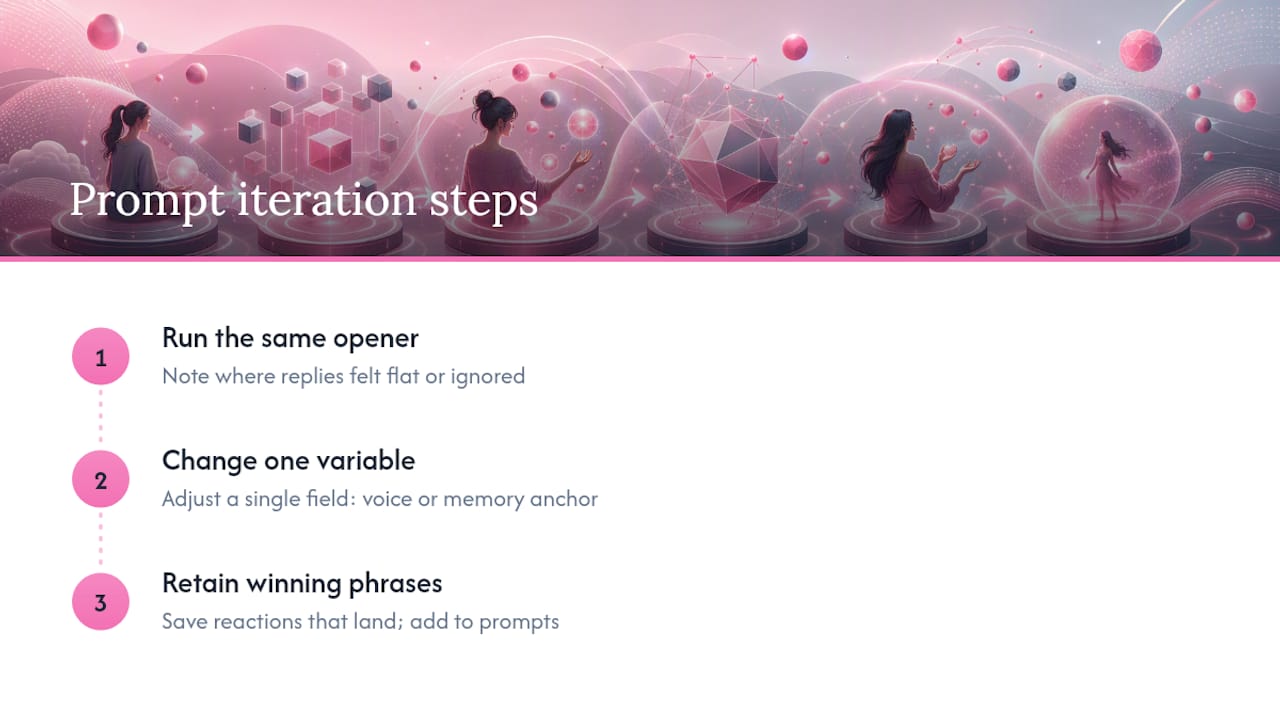
Keep a running list of phrases or reactions that consistently land well, and fold them into your negative or positive prompts going forward. Over a few weeks, most people end up with a character sheet that’s noticeably tighter than what they started with, built entirely from small corrections rather than one perfect first draft.
What I’ve Learned Writing These Prompts
The biggest fix is almost always the smallest one: trimming a bloated character sheet down to three memory anchors instead of ten stopped more personality drift than any clever scene starter ever did. Start with one scene and one anchor, get it working, then expand. Resist the urge to front-load everything on day one.
— Pierce
Build and Save These Prompts with MyDreamGirlfriend
Writing a good prompt stack once is only half the win. The other half is having somewhere to save it so you’re not rebuilding a character sheet from scratch every session. MyDreamGirlfriend’s character creator maps directly onto the fields covered here: your character core and conversation style live in the personality settings, your memory anchors save to a persistent chat memory instead of disappearing when you close the tab, and scene starters carry over between sessions instead of resetting every time.
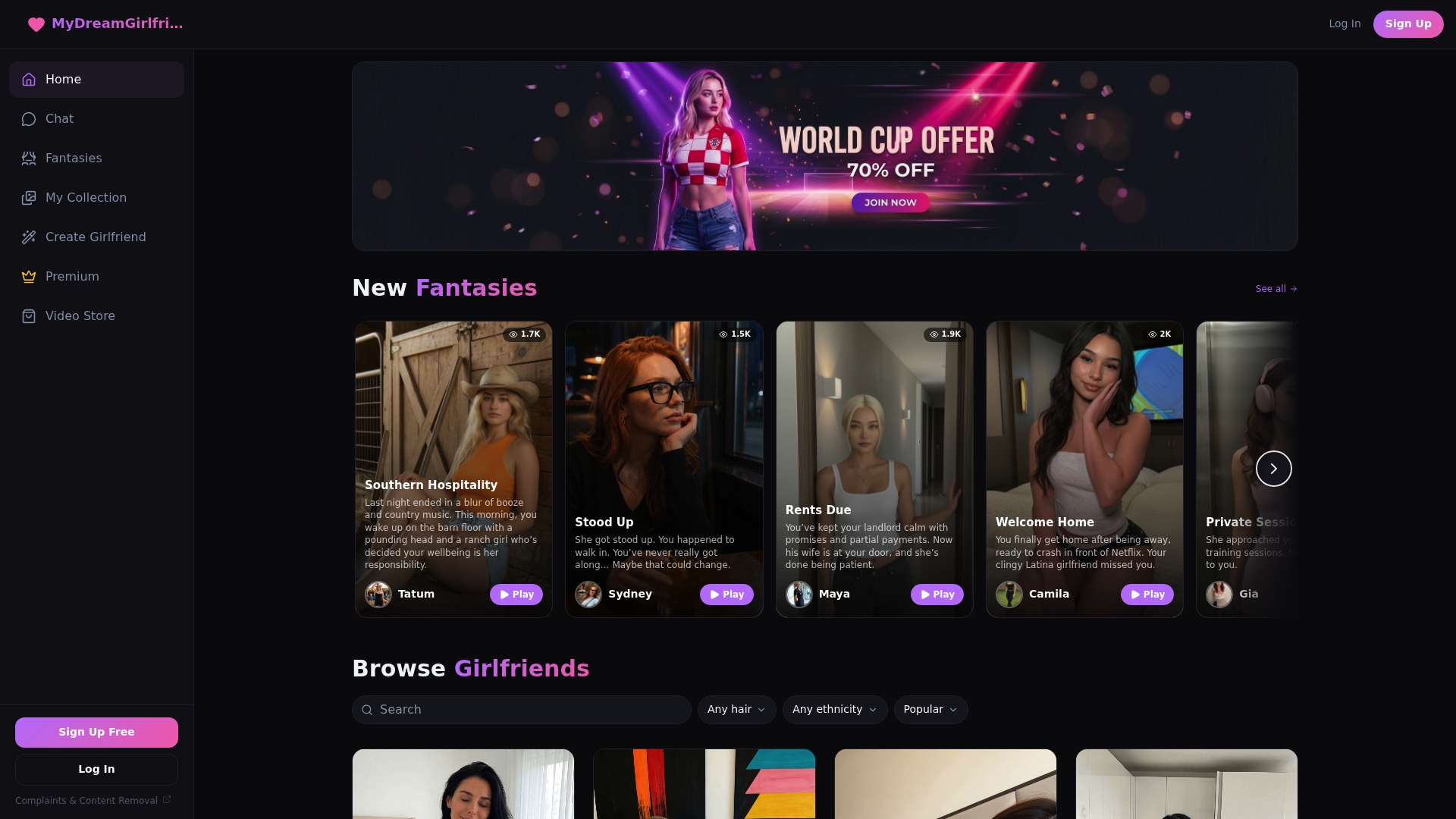
If you’d rather test a template against an existing persona before building your own, browse the AI girlfriends already set up on the platform and see how a scene starter plays out. Once you’ve found a voice and pacing that feels right, save it as your own character and keep building from there.
Sources
For readers who want to go deeper: Zendesk’s persona and tone guidance covers voice-register design. Scrile’s roleplay etiquette rundown explains consent and re-anchoring in more depth. OhGirlfriend’s character sheet guide walks through memory anchor placement. PromptQuorum’s negative prompting guide breaks down exclusion techniques in detail.
- Recommendations for building an AI agent persona and tone of voice — Zendesk Support
- Replika AI roleplay: Tips, safety, etiquette — Scrile
- AI Girlfriend Character Sheet That Keeps Chats Consistent — OhGirlfriend
- Negative prompting — PromptQuorum
FAQ
What are some good prompts for creating AI girlfriends?
Start with a compact character sheet covering personality, relationship stage, voice, and one boundary, then pair it with a two to four sentence scene starter that gives the AI a concrete action to respond to.
What is the best prompt for a chatbot girlfriend?
There’s no single best prompt, but the strongest ones combine a short character core with a specific opening scene rather than a vague request like “be my girlfriend.”
What are some cool AI prompts to try?
Slow-burn friends-to-lovers scenes, playful banter with pushback built in, and cozy domestic check-ins tend to produce the most natural, varied replies compared to generic affectionate openers.
What makes AI companion prompts different from general chatbot prompts?
AI companion prompts rely more heavily on consistent memory anchors and a defined relationship frame, since the goal is continuity across many sessions rather than a single useful answer. Platforms like MyDreamGirlfriend build memory storage specifically around that need.
How do I fix an AI girlfriend prompt that isn’t working?
Change one field at a time, usually the voice label or a memory anchor, and test the same opener again before rewriting the whole character sheet.